Gulf Snapshot CV
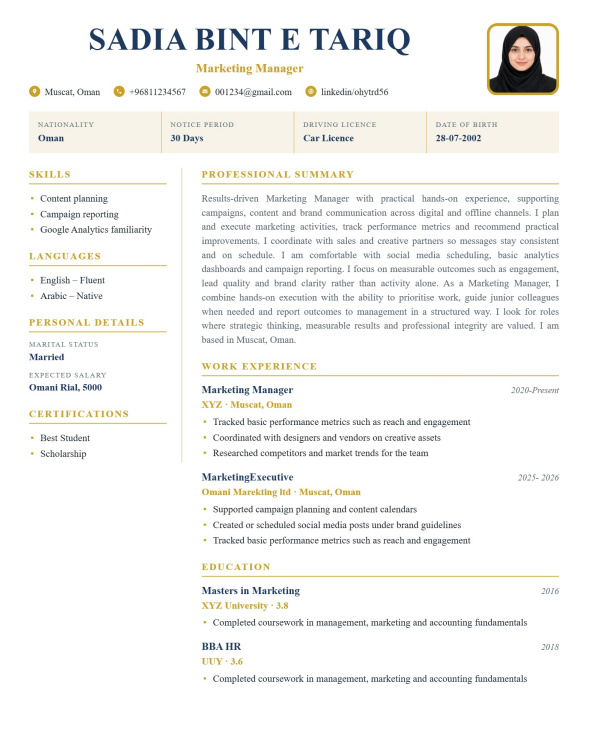
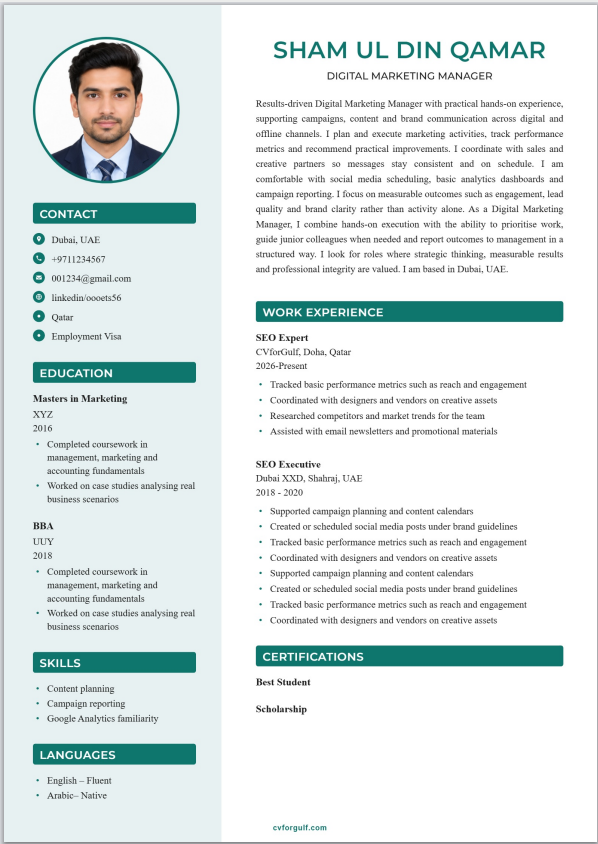
Navy and gold two-column CV with key-facts bar (nationality, visa, notice, licence). Built for Gulf recruiters who scan eligibility first.
- Built for Gulf countries (UAE, Saudi, Qatar, Kuwait, Oman, Bahrain)
- Clear section headings for ATS screening
- Optional profile photo (on/off in builder)
- Export PDF after you fill your details
- Included with Gold packages
Your personal details stay the same across designs — only the layout changes when you switch templates in the builder.
Gulf recruiters often decide in seconds whether a CV is even eligible. They look for nationality, visa or transfer status, notice period and sometimes driving licence before they read long duty lists. The Gulf Snapshot CV template on CVforGulf puts those facts in a key-facts bar under the header, then uses a clean navy-and-gold layout with skills on the side and experience in the main column.
This design is free with a CVforGulf account (same tier as other sign-up templates). You edit online, see a live preview, and download PDF. Word export follows your account rules. The preview is meant to match what you export — so you are not surprised when the file lands on a hiring desk in Dubai, Riyadh or Doha.
What “Snapshot” means on this CV
Snapshot is not a photo collage. It means the first screen of your CV answers the questions Gulf HR repeats every day:
- What is your nationality?
- What is your visa or residency status?
- How long is your notice period?
- Do you hold a driving licence if the role needs one?
- Date of birth when the employer still asks for it
Those fields only appear when you fill them. Empty lines stay hidden. You can turn the whole key-facts bar off from the Design tab if a particular application should stay minimal.
Layout at a glance
- Header — name, target job title, contact details, optional photo
- Key-facts bar — eligibility details in one scan line
- Sidebar — skills, languages, remaining personal details, certifications
- Main column — professional summary, work experience, education
Navy and gold stay professional without looking like a wedding invitation. You can still change accent colours and fonts in the Design tab so the page fits your sector.
Built for UAE, Saudi and wider GCC applications
Whether you are applying in the UAE, Saudi Arabia, Qatar, Kuwait, Oman or Bahrain, recruiters are used to scanning eligibility early. A CV that hides visa status on page two wastes their time. Gulf Snapshot keeps summary and experience readable while those facts stay visible near the top.
This helps both:
- Candidates already in the country on transfer or freelance status
- Candidates abroad who must state passport nationality and willingness to relocate
Write only what is true. Do not claim a visa status you do not have.
How to write the summary and experience on this template
Keep the professional summary short — roughly five strong sentences for a Gold-level assist draft, fewer if you are on the free tier. Aim the summary at one target role, not every job you might accept.
For experience:
- Start each job with title, employer, location and dates
- Use bullets for duties and results
- Prefer numbers and tools when they are real (team size, systems, sites)
- Match a few keywords from the job description without stuffing
Use the builder’s duty suggestions as a checklist, then delete anything you did not do. CVforGulf assist is rule-based help from your inputs — not a licence to invent employment.
Photo, ATS and Gulf expectations
Many Gulf employers still expect a professional photo. This template supports a photo in the header area. Use a plain background and formal dress. If a specific portal asks for no photo, remove it before you export that version.
For online portals, pair this layout with an ATS check on a saved CV. Simple headings and real text parse more reliably than text locked inside images. Gulf Snapshot is designed as structured text, not a flat picture of a CV.
Free account versus Gold
Gulf Snapshot itself is a free sign-up template. You need an account; you do not need to pay only to use this layout. Gold packages unlock other designs, higher assist limits, more saves and full cover-letter AI. Expert services are separate when you want a human writer. See the clear comparison on pricing.
Pakistan applicants targeting the Gulf
If you also apply inside Pakistan, keep Pakistan Classic for local formal processes and use Gulf Snapshot when the advert is GCC-focused. One profile in your account can feed both layouts so you are not maintaining two unrelated life stories.
Step-by-step: first Gulf Snapshot CV
- Create a free account
- Open Gulf Snapshot in the builder
- Fill contact details and target title
- Complete nationality, visa, notice and licence if relevant
- Write summary and experience; add skills the job actually needs
- Preview, then download PDF (and Word if your account allows)
- Optional: save and run ATS or JD match tools before applying
When to choose a different template
- Need a Pakistan academic table with CGPA column → Pakistan Classic
- Need instant free PDF with no account → choose a free-instant template from the gallery
- Need premium visual designs → Gold or Premium Gold templates on pricing
- Need a human-written CV → expert CV writing
Honest use
CVforGulf does not apply to jobs for you and does not access your LinkedIn or email inbox to scrape data. You own what you type. Download files stay under your control. Optional branding on the footer can be turned off when you export.
Start with Gulf Snapshot
If your next applications are Gulf-facing and you want eligibility facts visible at a glance, start here. Sign up free, fill the key-facts bar with true information only, and export a CV that matches how many regional recruiters actually read the first screen.
Use Gulf Snapshot CV → · Free sign-up · All CV templates · Cover letter builder
How to use this template on CVforGulf
- Open the builder with the primary button above (sign up if this design requires a free account).
- Enter your details — summary, experience, education, skills and optional photo.
- Download PDF (and DOCX when eligible) and apply to Gulf or Pakistan roles.
Frequently asked questions
Is this CV template ATS-friendly?
Yes. CVforGulf templates use clear section headings, standard fonts and structured text so applicant tracking systems used by Gulf and Pakistan employers can read your content reliably.
Can I download this template as PDF and Word?
Yes. After you fill your details in the builder you can export PDF and, when signed in with an eligible account, DOCX — with the same content structure as the live preview.
Is a photo required for Gulf CVs?
Many Gulf employers expect a professional photo; Pakistan applications vary by industry. This template supports an optional photo you can turn on or off in the builder.
Who can use this template?
This design is part of our Gold plans. See Pricing for package limits, or start with a free template first.
Related CV templates
Ready to build your CV?
Start with this design or explore free and Gold templates for Gulf careers.